Workflow Builder

Audio Workflows with 60+ Professional Modules

Chain stem separation, AI mastering, chords & lyrics transcription, effects, and localization on a visual canvas. One upload, one run - built for producers, DJs, guitarists, video editors, and podcasters.

Studios can share the same canvas on Teams.

How a workflow runs

Pick a ready template, wire professional modules on the canvas, upload once, and confirm the Credits quote. Audio, chords, and lyrics land in your library from a single run.

  1. 01

    Pick a template or start blank

    Karaoke pack, remix prep, live rescue, podcast cleanup - or drag modules onto an empty canvas.

  2. 02

    Connect modules and upload

    Wire Input through any chain to Output. One file feeds the graph. The quote shows Credits before anything runs.

  3. 03

    Run once, get everything

    Stems download directly. Chords, lyrics, and transcripts open in viewers in your Audio Tools library.

Teams plan

Collaborate on the same canvas

Studios on Teams share one Workflow Builder graph. Invite engineers to the workspace, run from pooled Credits, and keep the chain instead of passing screenshots. Three seats are included; extra seats do not add Credits.

  • Shared graph for every seat on the team
  • Credit quote comes from the pooled balance
  • Either engineer can open it and hit Run

Workflows on the canvas

Real graphs from the Workflow Builder - parallel branches, mastering chains, and localization paths you can open and customize.

AI Mastering

Release prep

Master your track your way

Run AI mastering on any mix, then keep building - drop in effects, processing, or delivery steps on the same chain. One upload, one run, a finished master plus whatever else you need beside it.

Use AI Mastering template

Mastering styles

Mastering styles

Match the vibe, not a fixed preset

Choose how the master should feel - radio-ready, loud for playlists, soft and easy, warm and full - or open Advanced when you want full control over polish, loudness, and tone.

Open mastering settings
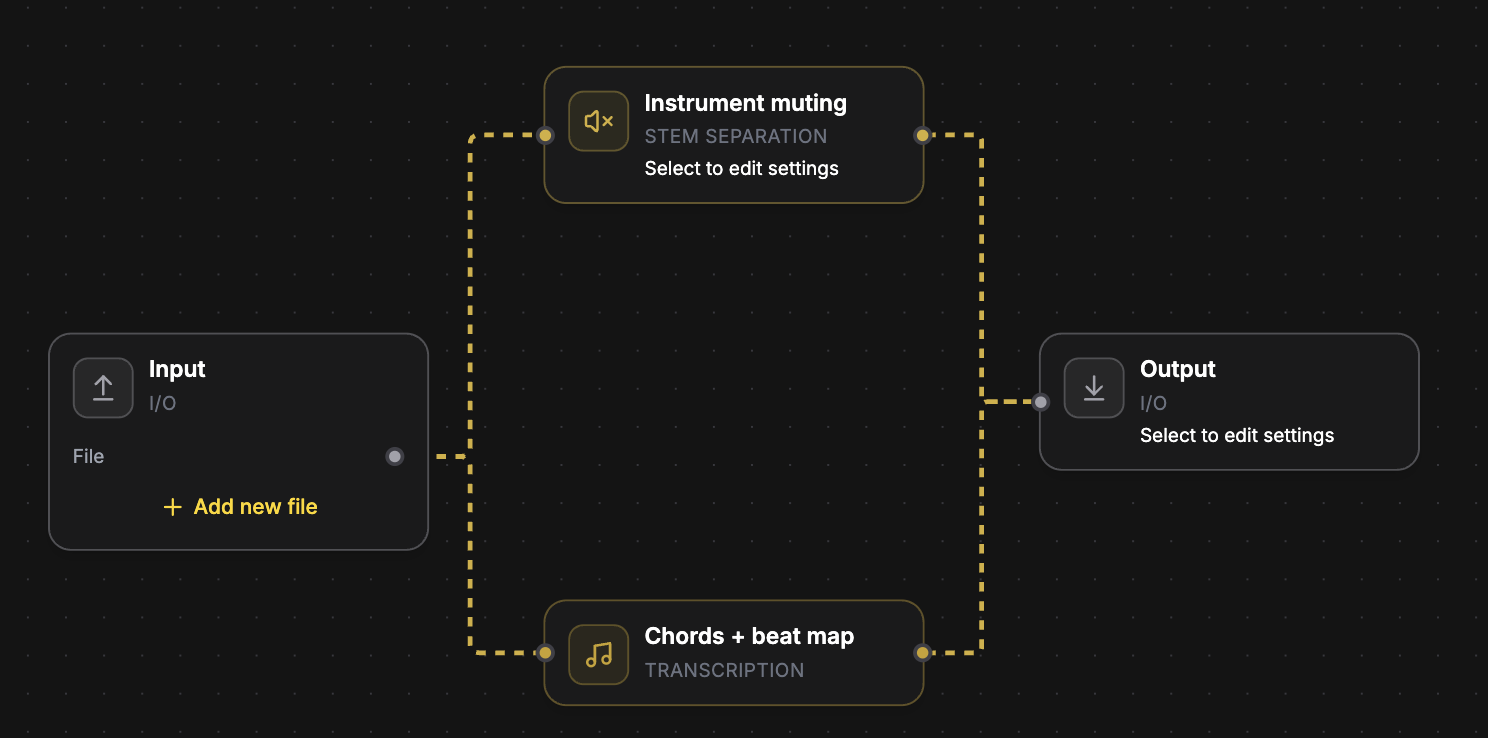
Workflow for instrument muting with chords and beat map for practice

Play-along practice

Practice along without fighting the mix

Mute the instrument you're learning and get a chord chart from the same song. Backing track plus sheet music in one go - built for guitarists, singers, and students.

Use Play-Along Practice
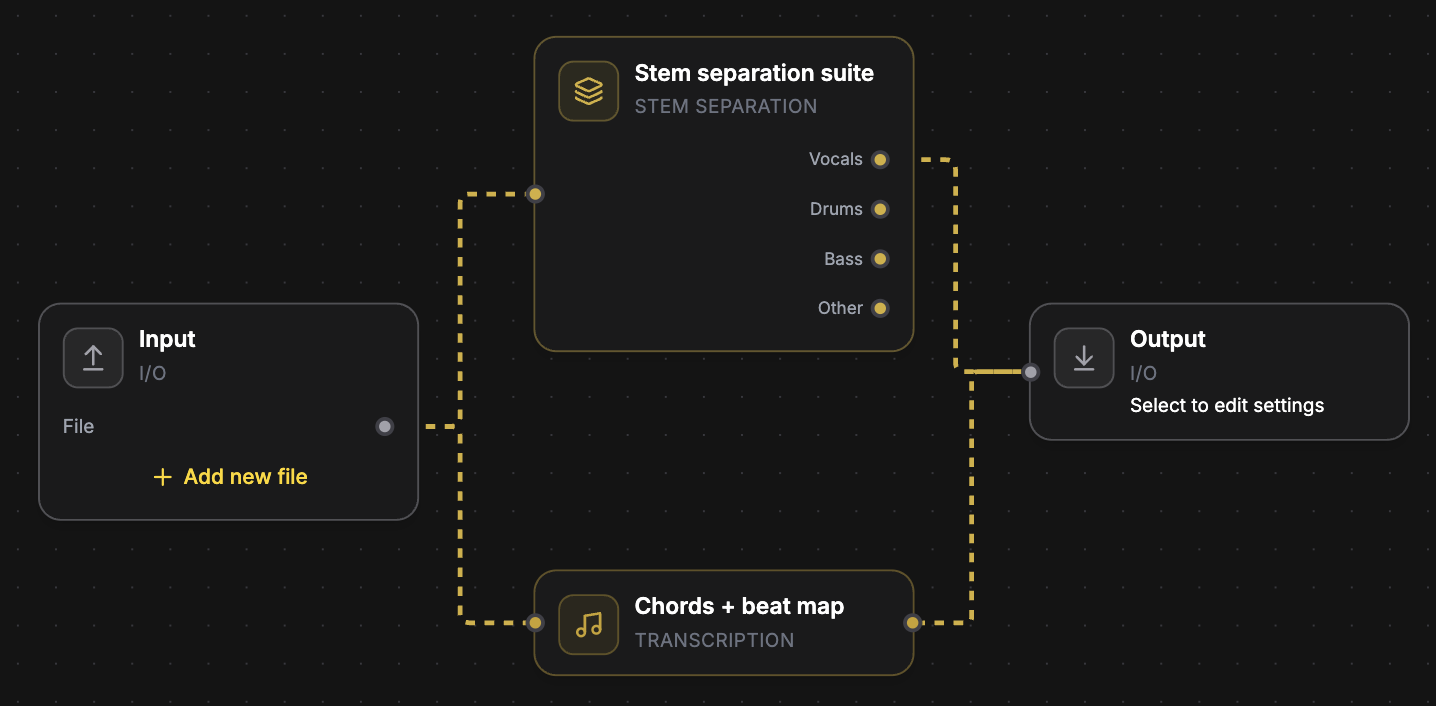
Workflow combining stem separation with chords and beat map

Song blueprint

Learn the song and pull the parts

Get clean stems and a chord chart from one track. Remix, rearrange, or practice with the pieces already separated - no second upload, no separate tools.

Use Song Blueprint
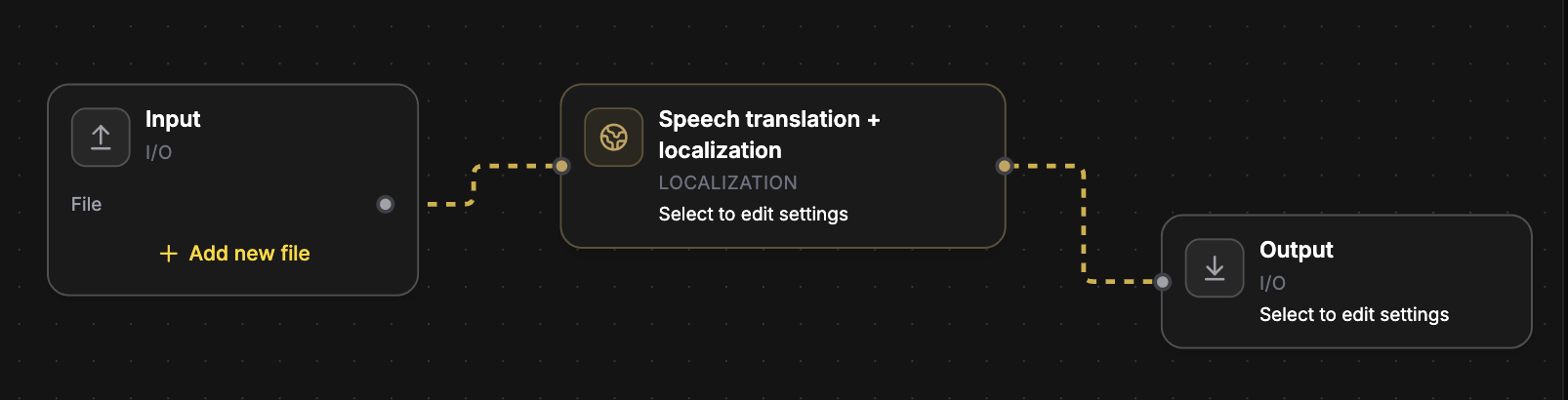
Workflow for speech translation and localization

Localization

Take dialogue to another language

Translate and localize speech for video, podcasts, or dubs. Same canvas as your music tools - upload once and ship a version ready for another market.

Use Dub / Localize

Not just for mixing engineers

Workflows turn professional audio processing into one-click jobs for every kind of creator.

Music producers

Stem packs, AI mastering, remix prep, and release metadata - chained in one canvas run instead of five separate uploads.

DJs & remixers

Four clean stems plus key, BPM, and a beat grid from any track. Everything a remix or DJ edit needs, in one job.

Guitarists & musicians

Chord sheets with beat grids, play-along backing tracks with your instrument muted, and slowed-down practice versions.

Live musicians

Rescue a stereo board mix or phone recording: trim dead air, lift the vocal, then AI-master so the take sounds louder and more finished.

Video editors

Split film audio into dialogue, music, and effects stems. Translate and localize speech for other markets.

Podcasters

Trim silence, level to podcast loudness, and get a word-aligned transcript from a single episode upload.

Singers & karaoke

Instrumental backing tracks plus time-aligned lyrics with a synced player - a karaoke machine from any song.

Ready workflow templates

Every template opens pre-wired on the canvas - customize modules and settings, or run it as-is. Templates auto-save to My Workflows.

Audio Mastering

Who it's for: producers

Master your mix for pro-level delivery loudness and polish.

Isolate Vocals

Who it's for: producers & remixers

Extract a vocals-only stem from any mix.

Instrumental Backing Track

Who it's for: singers & karaoke

Remove lead vocals and keep an instrumental backing track.

Use this templatestemsinstrumentskaraoke

Vocals + Accompaniment

Who it's for: producers

Split a mix into vocals and instrumental accompaniment.

Use this templatestemsvocalsmixing

Voice Focus Mastering

Who it's for: producers

Increase voice stem presence and master the new mix.

Use this templatevocalsmasteringai

Drums Focus Mastering

Who it's for: producers

Focus the mix on drums with mastering-oriented processing.

Use this templatedrumsmasteringai

Guitar Focus Mastering

Who it's for: guitarists

Increase the guitar stem and master the new mix.

Use this templateguitarmasteringai

Isolate Bass

Who it's for: bassists & producers

Isolate bass from any song for remixing and production.

Isolate Drums

Who it's for: drummers & producers

Isolate drums from any song for remixing and production.

Pitch Shift

Who it's for: musicians

Adjust the pitch of an audio file without changing tempo.

Use this templateeffectspitch

Stem Separation Suite

Who it's for: producers & DJs

Separate vocals, drums, bass, and other for remixing.

Use this templatestemsmusicalmixer

Full Musical Stems

Who it's for: producers & engineers

High-precision pack: auto-detect and separate every instrument found - vocals, drums/kit, bass, guitars, piano, keys, strings, wind, and more.

Use this templatestemsmusicalinstruments

Chords & Lyrics

Who it's for: guitarists & singers

Detect chords + beat map and transcribe time-aligned lyrics in one run. Results open together in the Library with a synced player.

Use this templatetranscriptionchordslyrics

Karaoke Pack

Who it's for: singers & karaoke

Instrumental backing track plus time-aligned lyrics in one run - everything you need for karaoke night.

Use this templatekaraokelyricsinstruments

Play-Along Practice

Who it's for: guitarists & students

Mute your instrument (guitar by default - change it in the module settings) and get the chord sheet to play from.

Use this templatepracticechordsguitar

Song Blueprint

Who it's for: musicians & educators

The full map of a song: intro/verse/chorus sections, chords + beat grid, and time-aligned lyrics.

Use this templatetranscriptionchordslyrics

Speed Trainer

Who it's for: music students

Practice version at 75% tempo without pitch change - adjust the factor, or transpose with the pitch module.

Use this templatepracticeeffectstempo

Remix Prep Kit

Who it's for: DJs & remixers

Four stems (vocals, drums, bass, other) plus key, BPM, and beat grid - everything a remix or DJ set needs.

Use this templatestemschordsremix

Release Prep

Who it's for: producers & labels

Master the track (WAV), encode an MP3 for quick sharing, and pull genre / mood / musical metadata for distribution.

Use this templatemasteringmetadataencoding

Slowed + Reverb

Who it's for: creators

The classic slowed + reverb edit: 85% speed into a big room reverb.

Use this templateeffectscreativereverb

Live Recording Rescue

Who it's for: live musicians & engineers

Trim dead air, lift the vocal, then AI-master a stereo live recording so a board mix, venue capture, or phone take sounds louder and more finished. Voice-focus has no knobs - change style and loudness on Audio Mastering.

Use this templatelivemasteringvocals

Podcast Cleanup

Who it's for: podcasters

Trim silence, level the episode to podcast loudness, and get a word-aligned transcript.

Use this templatepodcastspeechtranscription

Video Dialogue Rescue

Who it's for: video editors

Split film / video audio into dialogue, music, and effects stems for editing and re-mixing.

Use this templatestemsvideodialogue

Dub / Localize

Who it's for: video & localization teams

Translate and localize spoken content for another market - set the target language in the module settings.

Use this templatelocalizationspeechtranslation

Audio Mixer

Who it's for: engineers

Mix up to 8 channels with volume and phase. Add new file on Input to grow channels.

Stereo Mixing

Who it's for: producers & engineers

AI stereo mix from stems. Input exposes one upload per stem channel.

Use this templatemixingstemsai

Voice Transfer

Recast a vocal onto a target voice. Upload the source take, then set the target-voice file on the module.

Use this templatevocalsenhancementvoice

Speech Noise Suppression

Clean background noise from speech or dialogue.

Use this templatespeechpodcastenhancement

Transcribe Lyrics

Pull sung lyrics as text without timing alignment.

Use this templatelyricstranscription

Instruments Detection

List which instruments are present in the mix.

Use this templateclassificationmetadata

Text to Speech

Generate spoken audio from a script. Paste text on the module; billed by character count.

Use this templatevoicegenerationspeech

Professional modules on one canvas

Every module can be wired into any workflow - mix and match across categories. Click any module to see what it outputs and which ready workflows use it.

Quote first, then run

Workflows use Credits. The quote shows every billed module before you confirm, credits scale with track length, and failed jobs are refunded automatically.

Build your first workflow

Start from a template or an empty canvas - your workflows save to your account and re-run on any new file.

Frequently asked questions