
Client Revisions
Send mixes to your clients, collect timestamped feedback, and turn every note into actionable mix improvements.
Client Revisions is included on Studio+ (Studio / Studio+ / Teams) - send-for-review links, client listening, timeline comments, and action items in your analysis. Unlimited new sessions (fair use). Teams can white-label the review page with your studio name and logo. Maya Personal Mentor with full client-feedback context is available on Studio and above.
The client feedback problem
Most engineers do not lack taste - they lack a system. Without a dedicated workflow, client communication becomes the bottleneck.
- Clients send feedback through WhatsApp, email, screenshots, and PDFs - none of it lines up with your session.
- Notes are messy, duplicated, or contradictory, so you rebuild the story every time.
- There is no reliable link between what they heard and where it happens on the timeline.
- Revision history lives in chat threads instead of next to the work, so tracking changes is exhausting.
- You waste hours turning vague language into real mix moves instead of finishing the record.
What Client Revisions does
Client Revisions is a professional loop for engineers who deliver mixes to real people - not a generic comment box. It is included on Studio+ (Studio / Studio+ / Teams; unlimited new sessions, fair use).
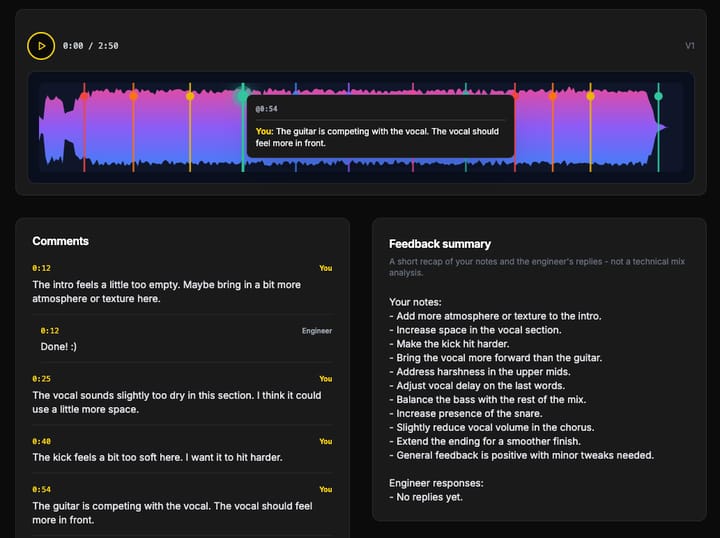
- Send a dedicated listen link for each mix version your client should judge.
- They hear the bounce and drop feedback at specific timestamps - no DAW required on their side.
- Everything lands in one place, structured around the timeline - not scattered across apps.
- You keep a professional revision loop: send, listen, note, fix, ship again.
Privacy by design: clients only see the feedback interface - they do not see your mix analysis or score.
Timestamped feedback, structured action items, and a clear handoff between client communication and engineering time - that is the layer MixMaster Pro adds on top of analysis.
The revision loop
This is the core workflow: one continuous loop from bounce to bounce, with no dropped notes and no mystery feedback.
- 1
Send a mix version to your client
Share a listen link for the exact bounce you want feedback on - no extra tools required.
- 2
Client leaves timestamped feedback
Notes land on the timeline while they listen, so nothing is lost in translation.
- 3
Feedback is collected automatically
Every comment stays in one structured thread tied to your mix session.
- 4
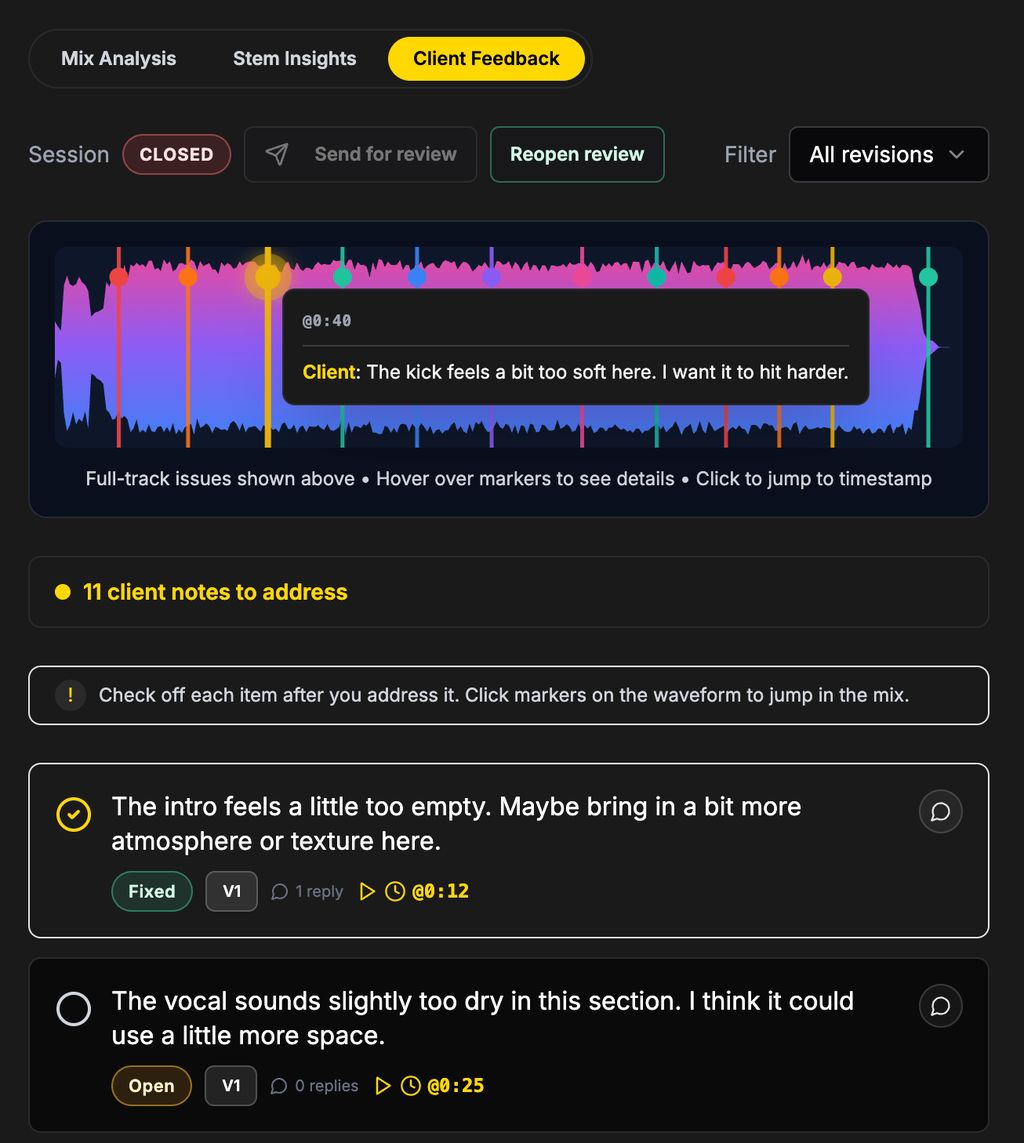
Feedback becomes action items
Client notes show up in your analysis To-Do list as concrete tasks - not a separate inbox.
- 5
You fix the mix
Work the list in place: address level, tone, balance, and arrangement with full context.
- 6
Send a new version and repeat
Close the loop: ship the next bounce, capture new notes, and keep revisions moving.
Feedback is not a separate product
Client notes are not siloed in another tool. They flow into the same action-item system you already use alongside spectral views, diagnostics, and version history - so you solve client requests with the same rigor you apply to technical findings.
Open your To-Do list inside the analysis, work client-driven items next to analysis-driven ones, and keep one prioritized picture of what still needs to move before the next bounce.
Not sure how to read a client note? Ask Maya.
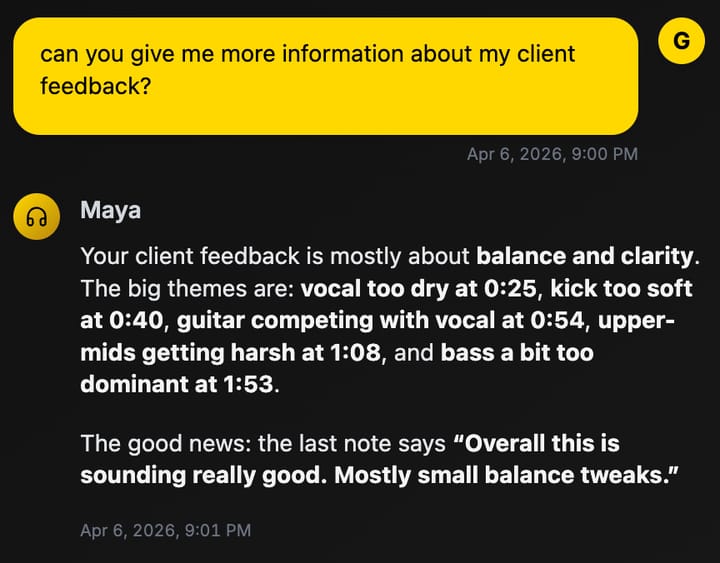
Maya is your Personal Mentor inside MixMaster Pro. When client feedback is vague ("make it warmer," "the vocal feels small"), she can read the same timestamped notes you see, relate them to your mix context, and answer in plain language - without your client ever seeing your analysis report or score.
Ask her to summarize themes across every note ("what are the top three problems they keep pointing at?"), turn a single comment into EQ and dynamics suggestions, or sanity-check your next bounce against what they asked for. She stays in the engineering seat: you decide the moves; she helps you interpret and prioritize.
- Collapse a wall of chat into a short list of technical themes (balance, tone, dynamics, space) tied to real timestamps.
- Compare what the client heard to your revision plan so the next version directly addresses their notes - not your guess.
Personal Mentor (Maya) with session-aware access to client feedback is included on Studio and above (Studio / Studio+ / Teams). Upgrade if you want this layer on every revision round.
Stop chasing feedback. Start managing revisions.
MixMaster Pro is how you run professional client communication alongside deep mix analysis - one platform, one loop, every bounce accounted for.
Client Revisions (listening links, timeline feedback, action items) is included on Studio+ (Studio / Studio+ / Teams). Maya with client-feedback context is available on Studio and above.