
Check Your Mix Against
Spotify's Loudness Standard
Every streaming platform normalizes loudness. If your mix is too loud, it gets turned down. Get your LUFS, true peak, and dynamic range readings before you submit - so nothing surprises you after distribution.
Streaming loudness targets at a glance
| Platform | LUFS target | True peak |
|---|---|---|
| Spotify | -14 LUFS | -1 dBTP |
| Apple Music | -16 LUFS | -1 dBTP |
| YouTube | -14 LUFS | -1 dBTP |
| Tidal | -14 LUFS | -1 dBTP |
| Amazon Music | -14 LUFS | -2 dBTP |
| SoundCloud | No normalization | -1 dBTP |
Targets based on published platform normalization specs. May vary by distribution partner.
What the loudness analysis covers
Integrated LUFS Check
Get your mix's integrated loudness reading against the exact targets used by Spotify, Apple Music, YouTube, and other major platforms - before you master or submit.
True Peak Detection
Know if your mix will clip after codec encoding. True peak analysis catches inter-sample peaks that won't show on a standard meter but will cause distortion after MP3 or AAC encoding.
Dynamic Range Analysis
LRA (Loudness Range) tells you how dynamic your mix is. Over-compressed mixes lose dynamics and impact after streaming normalization. Know your number before it's too late to fix.
How it works
- 01
Upload your mix or master
WAV or AIFF at 24-bit / 44.1 kHz for the most accurate reading. MP3 and FLAC also work.
- 02
Get your loudness report
Integrated LUFS, true peak, LRA, and dynamic range - all measured against Spotify's and other platforms' normalization targets.
- 03
Fix before you submit
If your mix is too loud or has true peak issues, you'll see exactly what to adjust before distributing.
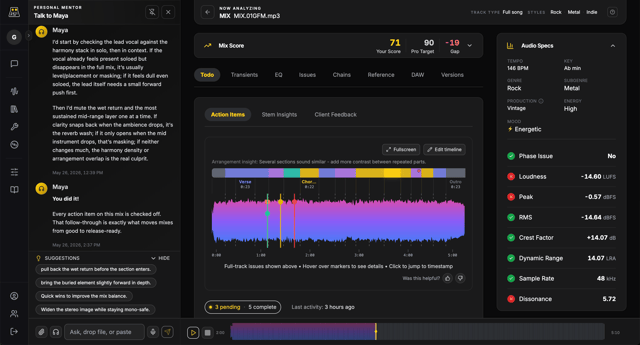
Know your LUFS before you submit
Upload your mix or master and get a full loudness report in under a minute.
Check Loudness FreeFrequently asked questions
Master streaming loudness the right way
Weekly guides on LUFS, true peak, dynamic range, and mastering for streaming platforms - in plain language.