
Find and Fix
Muddy Mixes with AI
Muddiness is the most common mix problem - and one of the hardest to hear clearly when you've been working on a song for hours. Get objective data on exactly where the buildup is and what to cut.
"It sounds fine in my headphones but muddy on speakers."
That gap exists because your ears adapt to your monitoring environment. The AI doesn't - it reads the data as it is.
How the analysis finds the mud
Frequency Buildup Detection
The analysis flags exact dB values where low-mid energy is accumulating between 200-500 Hz - the range that makes mixes sound thick, boxed-in, and unclear.
Masking Analysis
Find out which instruments are masking each other in the same frequency range, reducing intelligibility and making individual elements harder to hear.
EQ Action Items
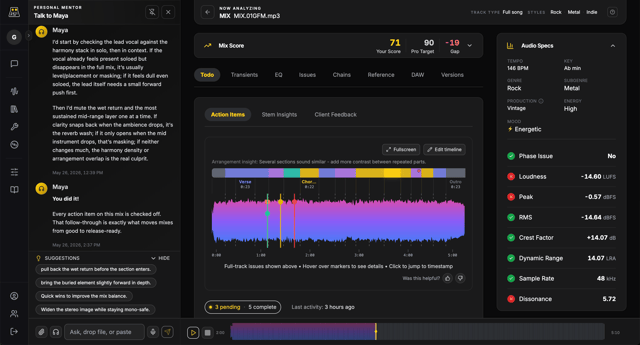
Every muddiness finding comes with a specific action item - which frequency to cut, by how much, and which instrument to target - so you know exactly what to do in your DAW.
How it works
- 01
Upload your muddy mix
WAV, AIFF, FLAC, or MP3. No preprocessing required.
- 02
Get the frequency map
The spectral analysis shows you a full picture of where energy is sitting and stacking across the frequency spectrum.
- 03
Apply the fixes
Each action item links to a specific measurement. Apply the EQ moves, re-export, and upload again to track improvement.
Stop guessing. Read the data.
Upload your muddy mix and get specific EQ action items in under a minute.
Analyze FreeFrequently asked questions
Weekly tips on mix clarity and low-end control
Practical techniques for fixing muddiness, managing low-mid buildup, and making every element sit in its own space.