
AI Mixing Feedback
for Rock Vocals
Vocals competing with a wall of distorted guitars is one of the hardest mixing challenges there is. Get AI-powered feedback on presence, harshness, sibilance, and balance - so your vocals sit perfectly without taming the energy out of the band.
200-8k Hz
vocal clarity range analyzed
Per-section
vocal balance tracking
Genre-aware
rock & metal thresholds
What the analysis covers
Vocal Presence & Harshness
Get dB readings on presence-range energy (2-5 kHz) and harshness (5-8 kHz) so you know exactly whether to push or pull the frequency that makes rock vocals cut through or scrape.
Vocal-to-Band Balance
See how your vocal level compares to the guitars, drums, and bass at any point in the track. The analysis detects sections where the vocal is buried or too far forward.
Sibilance & De-Essing Guidance
Detect sibilance peaks above 6 kHz that make vocals harsh on ear-bud listeners. Each flag comes with the threshold that triggered it and a suggested de-esser setting range.
How it works
- 01
Upload your rock mix
Full mix WAV or MP3. The analysis handles everything from intimate acoustic rock to heavily distorted metal.
- 02
Review vocal findings
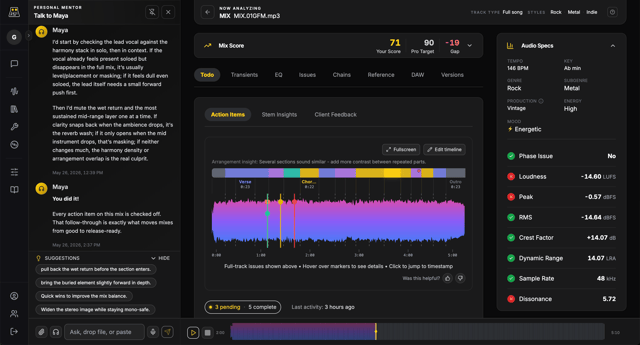
The report sections out vocal-specific results - presence, harshness, sibilance, and balance - alongside the full mix analysis.
- 03
Coach with Maya
Ask the AI mentor to walk through any finding, recommend specific plugin settings, or explain how the vocal should sit for your genre.
Make the vocal sit right - with data
Upload your rock mix and find out exactly where the vocal is fighting the band.
Start Free AnalysisFrequently asked questions
Rock mixing tips in your inbox
Practical guides on vocal presence, guitar-vocal balance, compression for rock, and mixing for loudness without losing dynamics.